

March 27, 2026
Defending Against “Legitimate Infrastructure” File-Sharing Phishing Campaigns
Share this post
Author
K‑12 school districts, colleges and universities, and public sector agencies operating in Microsoft 365 are increasingly being targeted by phishing campaigns that abuse legitimate cloud collaboration infrastructure. These attacks exploit native file‑sharing features in SharePoint Online, OneDrive for Business, and Google Drive to deliver malicious content while evading traditional email security controls.
For education and government organizations—where external collaboration is essential and security teams often operate with limited staffing and budget—these campaigns present a particularly high risk. Because the emails originate from trusted Microsoft or Google infrastructure and follow standard collaboration workflows, they frequently bypass Microsoft Defender for Office 365 native defenses and appear legitimate to both users and security tooling.
Guardian 365 has observed this technique across K‑12, higher education, and public sector tenants monitored by the Guardian 365 24x7x365 Security Operations Center (SOC),making it a growing concern for CISOs, IT directors, and SOC teams supporting education and government environments.
How These Attacks Target Education and Public Sector Tenants
Legitimate infrastructure phishing campaigns leverage workflows that are common—and typically required by essential business and operational processes—in education and government:1. Attacker‑Controlled Cloud Tenant Creation
Threat actors create their own Microsoft 365 or Google Workspace tenant, establishing legitimate collaboration infrastructure later to be used in sharing the malicious content.2. Malicious Content Hosted in Trusted Platforms
Credential harvesting pages, malware, or other malicious content is uploaded to:- OneDrive for Business
- SharePoint Online
- Google Drive
3. Abuse of Native File‑Sharing Invitations
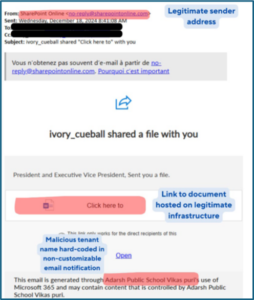
Attackers send file‑sharing invitations to users in school districts, universities, or government agencies using built‑in sharing features. See screenshot below for the “anatomy” of one of these emails. Note the non-customizable tenant name inclusion at the bottom of the message, as this section plays a key role in the available containment measures.
4. Delivery via Trusted Notification Emails
Users receive standard system‑generated emails from trusted sender addresses such as:-
no-reply@sharepointonline.com
-
drive-shares-dm-noreply@google.com
- SPF, DKIM, and DMARC validation succeeds
- Sender domains are legitimate
- URLs resolve to Microsoft or Google infrastructure
- Threat intelligence may not yet flag the content
Why Defender XDR and MDO Often Miss These Campaigns
Education and public sector security teams often rely on Microsoft Defender XDR and Defender for Office 365 as primary email security controls. While effective against spoofing and commodity phishing, these platforms are challenged by legitimate infrastructure abuse. Traditional detection relies on:- Suspicious or newly registered domains
- Malicious sending infrastructure
- Known bad URLs or payloads
Additional Risk: Compromised Legitimate Education or Government Tenants
Guardian 365 has also observed similar file‑sharing activity originating from compromised accounts within legitimate school districts, universities, or public sector agencies. These cases are especially difficult to detect because:- The sending tenant is reputable
- Email authentication and infrastructure signals appear normal
- External collaboration is expected behavior
- Repeated or generic language
- Unusual file names
- References to unfamiliar institutions or agencies
- Inconsistencies in tone or formatting
Recommended Technical Mitigation for Education and Government
Targeted Exchange Transport Rules (Most Effective)
For most education and public sector organizations, the most reliable mitigation is targeted Exchange Transport Rules aligned with Defender XDR telemetry. File‑sharing notification templates include the sending tenant’s organization name, which is hard‑coded into the email body. This provides a strong detection signal that can be combined with:- Suspicious file names
- Repeated sharing attempts
- Known malicious tenant identifiers
-
Sender address equals no-reply@sharepointonline.com
-
Subject or body contains <Malicious Tenant Name> (“Adarsh Public Schools Vikas puri” in the example above)
- Delete message without delivery or
- Quarantine message
Alternative Approach for High‑Volume Campaigns
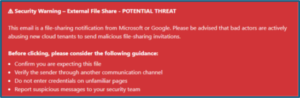
When attackers frequently rotate tenant names, maintaining targeted rules can become difficult for lean IT teams. In these cases, Guardian 365 recommends broader rules that: Detect SharePoint or OneDrive sharing notifications Prepend warning banners instead of blocking messages This approach balances security with usability and is often more practical for K‑12 districts and smaller public sector agencies with limited SOC capacity. Message disclaimers (warnings) used in this manner can be a very effective user-focused method to contain the spread and minimize the effectiveness of campaigns that cannot safely be contained via the ETR block/quarantine approach above without impacting legitimate mail flow. An example disclaimer is included below. These are configured through providing the transport rule with a simple HTML code block:
User Awareness in Education and Government Environments
Defense and containment mechanisms that remove threats altogether from end user visibility are always preferred, but campaigns like these also reinforce the long-standing truth that user training remains an essential layer of defense, particularly in environments with:- Large, diverse user populations
- High turnover (students, adjunct faculty, seasonal staff)
- Frequent external collaboration
- Unexpected or unsolicited file shares
- Generic file names (e.g., “Invoice,” “Document”)
- Sender organizations unrelated to their role
- Executive or administrator impersonation
- Unrecognized tenant names or domains
Summary: Control Effectiveness for Education and Public Sector
| Control | Effectiveness | Context |
| Microsoft Defender for Office 365 | Low | Legitimate infrastructure often bypasses filtering |
| Targeted Exchange Transport Rules | High | Most effective for known malicious tenants |
| Broad Rules + Warning Banners | Medium | Practical for lean IT and SOC teams |
| User Awareness (Attack Simulation) Training | Medium | Critical in high‑collaboration environments |
Ready to make security easy?
Find out where your organization stands. Our free security assessment gives you a clear picture of your current posture and a roadmap for what comes next.