
April 17, 2026
Microsoft Entra Hybrid Join: The New Kerberos Method Changes Everything for Education & Government IT
Share this post
Author
If your organization still runs Active Directory on-premises while using Microsoft 365 or Azure-based services, Hybrid Join is likely central to your device management strategy. Microsoft has now introduced a new Kerberos-based method for completing Hybrid Join — and for IT teams in education and government, it solves some very real, very persistent problems.
What Is Microsoft Entra Hybrid Join?
Microsoft Entra Hybrid Join (formerly Azure AD Hybrid Join) allows devices that are joined to an on-premises Active Directory Domain Services (AD DS) domain to simultaneously register with Microsoft Entra ID — the cloud identity platform underpinning Microsoft 365, Intune, and Conditional Access. For school districts, universities, and government agencies, this matters enormously. Most of these organizations carry significant on-premises AD infrastructure built over decades. Hybrid Join bridges that existing investment with modern cloud capabilities: single sign-on, Conditional Access policies, Intune device compliance, and seamless Microsoft 365 authentication — all without requiring a full migration to Entra-only (cloud-native) join. Until recently, there were two established paths to completing Hybrid Join. Understanding them helps explain why the new Kerberos method is such a meaningful step forward.The Two Established Hybrid Join Methods
1. Managed Environment (Password Hash Sync / Pass-Through Authentication)
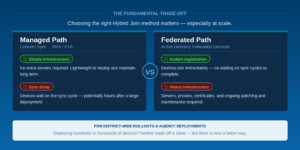
In a managed environment, the client writes a self-signed certificate to the computer object in Active Directory. Microsoft Entra Connect — the synchronization agent — then syncs that certificate along with the device’s object GUID and Security Identifier (SID) up to Azure Device Registration Service (DRS). The device object is created in Entra ID, initially in a Pending state. Only after that sync cycle completes can the device authenticate and finalize registration. This introduces an inherent timing delay — a real operational friction point for IT teams imaging and deploying large numbers of devices at once, as is common in school computer labs, government offices, and university lecture halls.2. Federated Environment (AD FS)
In a federated environment, Active Directory Federation Services (AD FS) acts as a trusted broker. The device contacts the AD FS enterprise device registration endpoint using Windows Integrated Authentication, receives a token proving its identity, and submits that token to Entra ID to complete registration. AD FS resolves the sync delay problem — registration can happen immediately — but it introduces its own complexity: dedicated server infrastructure, Web Application Proxies, WS-Trust endpoint configuration, TLS certificate management, and ongoing maintenance. For lean IT teams managing tight budgets (a near-universal reality in public sector and education), this overhead is a genuine burden.
The New Kerberos-Based Hybrid Join Method
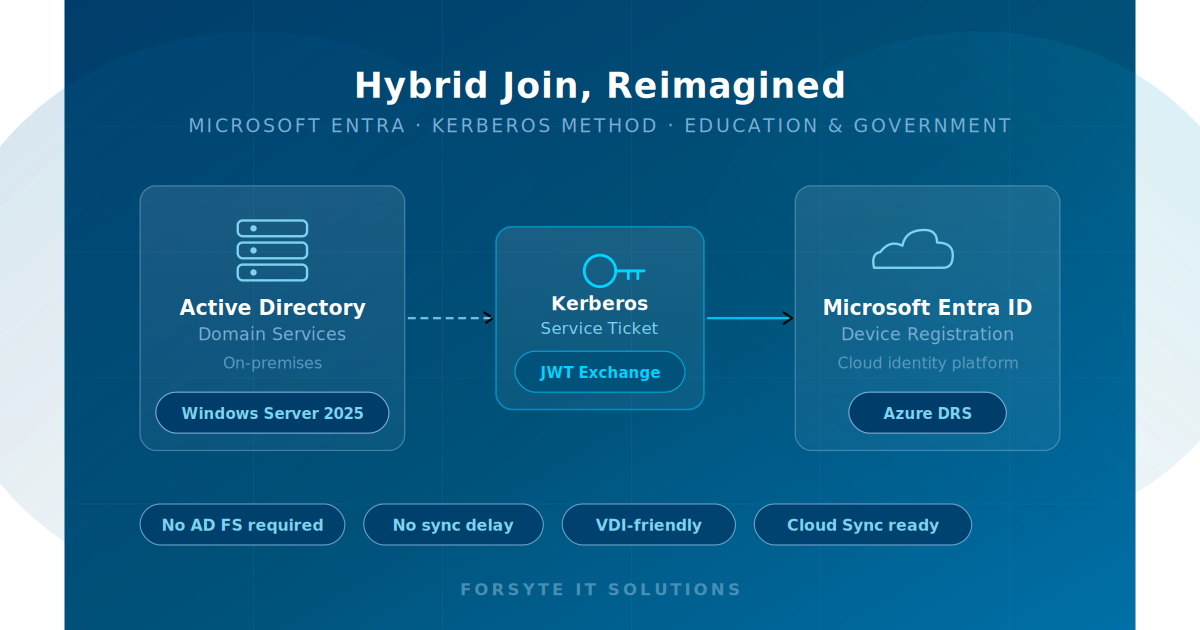
Microsoft’s new Kerberos method, currently in public preview, replaces both approaches with a direct, Kerberos-based exchange. It leverages the Key Distribution Center (KDC) role that already exists in every Active Directory deployment — and pairs it with a cloud-trusted domain object in Entra ID to complete registration without federation servers or sync dependencies. Here’s how it works:- The Automatic Device Join task fires as normal and reads the Service Connection Point (SCP), targeting Microsoft Entra ID for registration.
- Instead of writing a self-signed certificate or contacting AD FS, the client authenticates to a Windows Server 2025 domain controller. The DC’s KDC issues a Kerberos service ticket for the Microsoft Entra Device Registration Service.
- The client presents that Kerberos ticket to Entra ID. Entra ID validates it using the Microsoft Entra Kerberos Trusted Domain Object — a trust object established between on-premises AD and Entra ID — with no AD FS or sync agent involved.
- Entra ID exchanges the Kerberos ticket for a JSON Web Token (JWT). The JWT proves the device’s domain identity to Azure Device Registration Service.
- Azure DRS issues the device ID and certificate immediately. Hybrid Join is complete — no sync cycle wait, no federation server required.
Why This Matters for Education and Government IT
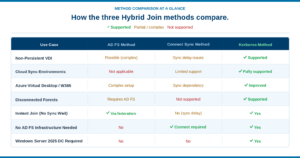
The operational benefits of the Kerberos method map directly onto the challenges that education and government IT teams face every day. Here’s a breakdown of the key advantages:- No AD FS Infrastructure
- Eliminate dedicated federation servers, Web Application Proxies, and WS-Trust configuration — reducing both cost and attack surface.
- Instant Registration
- Hybrid Join completes in a single authenticated exchange. No waiting on sync cycles — critical during large-scale device deployments.
- Cloud Sync Compatible
- Organizations using Microsoft Entra Cloud Sync — Connect’s lighter-weight successor — can now fully support Hybrid Join without switching tools.
- Disconnected Forest Support
- Where Connect Sync can’t function due to network topology, Kerberos-based Hybrid Join remains viable — as long as a Windows Server 2025 DC is reachable.
- Better VDI & Virtual Desktop Support
- Non-persistent VDI sessions and Windows 365 hybrid configurations no longer suffer from sync dependency issues. Pooled and ephemeral desktops are now fully supported.
- Reduced Maintenance Burden
- Fewer infrastructure components to patch, monitor, and manage — a meaningful operational win for lean public sector and education IT teams.
Specific Use Cases in Education & Government
K–12 School Districts: Large-Scale Device Deployments
School districts frequently deploy hundreds or thousands of devices at the start of each school year — Chromebook alternatives, Windows laptops, and shared lab workstations. Under the Connect Sync method, IT teams had to either wait through sync cycles before devices were fully provisioned or maintain complex AD FS infrastructure to avoid that delay. The Kerberos method eliminates this bottleneck, allowing same-day device readiness at scale.Higher Education: VDI and Virtual Desktop Infrastructure
Universities and colleges increasingly rely on Virtual Desktop Infrastructure for computer labs, library workstations, and remote access programs. Non-persistent VDI sessions — where desktops reset after each user session — are particularly problematic with sync-dependent Hybrid Join approaches. The Kerberos method’s immediate, stateless registration is a natural fit for this deployment model, including Windows 365 hybrid configurations used for remote learning environments.Government Agencies: Disconnected and Air-Gapped Environments
Some government networks — particularly in defense, law enforcement, and critical infrastructure — operate in environments where full sync agent connectivity isn’t feasible due to network topology or security segmentation. The Kerberos method’s independence from Connect Sync opens Hybrid Join to these environments in a way that previously required either AD FS complexity or architectural compromises.Public Sector IT Teams: Reducing Operational Overhead
Across all public sector contexts, IT teams are typically under-resourced relative to the environments they manage. Every server that doesn’t need to be maintained, every certificate that doesn’t need to be renewed, and every patch cycle that doesn’t carry federation risk is meaningful. The Kerberos method doesn’t just simplify Hybrid Join architecturally — it reduces the sustained operational cost of keeping identity infrastructure healthy.
What You Need to Get Started
The Kerberos Hybrid Join method is currently in public preview. Before planning a rollout, here are the key prerequisites your team should evaluate:- Windows Server 2025 Domain Controller: At least one Windows Server 2025 DC must be reachable from client devices during the join process. This is a hard requirement — the KDC on WS2025 is the Kerberos ticket issuer.
- Microsoft Entra Kerberos Trusted Domain Object: A trust object must be established between your on-premises AD and Entra ID. This is configured through Entra admin tooling and is the cloud anchor for Kerberos validation.
- KDC Proxy Group Policy (if applicable): If your environment uses a KDC Proxy Server GPO, additional Group Policy configuration is needed to map the Microsoft Entra Kerberos endpoint correctly.
- Preview enrollment and testing: As this feature is in preview, Forsyte recommends piloting in a non-production OU before broad rollout, and monitoring Microsoft’s public preview documentation for changes prior to general availability.
Our Recommendation for Education & Government Clients
The Kerberos Hybrid Join method represents a meaningful architectural simplification for organizations that have been managing the friction of either sync delays or AD FS overhead. For education and government clients, the benefits are particularly well-aligned: If you’re currently running AD FS primarily to support Hybrid Join and don’t have other federation requirements, this method offers a clear path to decommissioning those servers — reducing your infrastructure footprint and the associated security and maintenance burden. If you’re on Entra Cloud Sync and have been unable to support Hybrid Join without a full Connect deployment, this resolves that gap. And if you operate a VDI environment for students, faculty, or staff, the move to Kerberos-based join significantly simplifies device lifecycle management for non-persistent sessions. As with any preview feature, we recommend evaluating in a controlled pilot environment before production rollout. The Forsyte team is actively testing this method across several client environments and will provide updated guidance as the feature approaches general availability.Ready to make security easy?
Find out where your organization stands. Our free security assessment gives you a clear picture of your current posture and a roadmap for what comes next.