



Executive Summary: On May 1, 2026, Instructure confirmed a major breach of its Canvas LMS platform, attributed to the criminal extortion group ShinyHunters. The attack exposed names, email addresses, student IDs, and private messages across nearly 9,000 educational institutions globally — making it the largest educational security breach on record. After a second-wave defacement attack on May 7 and a ransom deadline of May 12, Instructure reached an agreement with ShinyHunters and received digital confirmation of data destruction. As of this update, Forsyte has not observed any confirmed Microsoft 365 or Entra ID tenant compromise directly tied to the Canvas breach in the Guardian 365 EDU community. Customers may return to normal Canvas operations, but Guardian 365 recommends increased attention and investment in security controls such as OAuth App Governance and continued close monitoring of highly privileged vendor integrations. This advisory details the full incident timeline, ongoing threat vectors to monitor, and specific controls your institution should consider implementing today.
The Canvas LMS Breach: A Full-Picture Update for Education IT Leaders
If your institution uses Canvas LMS, the events of early May 2026 have demanded your attention. What began as a disclosed cybersecurity incident quickly escalated into a high-stakes extortion campaign affecting some of the largest educational institutions in the world. This advisory brings together what we know from Instructure’s public statements, independent security research, and the Guardian 365 SOC’s own threat hunting activity across our EDU customer community.
Read on for a plain-language breakdown of what happened, the current state of resolution, what the data says about the broader threat environment for education, and the specific controls your Microsoft 365 environment may be missing right now.
1. Incident Timeline: What Happened and When
Understanding the full sequence of events is critical context for the ongoing threat posture. The Canvas breach did not unfold as a single moment — it was a multi-week campaign with two distinct waves of malicious activity.

The root cause was an architectural vulnerability in Canvas’s Free-For-Teacher (FFT) account program, which allowed educators to create Canvas tenants without institutional verification. This weaker trust boundary between FFT and full institutional tenants — all sharing the same underlying infrastructure — gave ShinyHunters an entry point directly into production Canvas data.
2. The Breach by the Numbers
The scale of this incident is difficult to overstate. Multiple independent sources have corroborated the following figures:
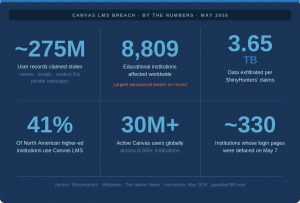
Exposed data categories confirmed by Instructure include: names, email addresses, student ID numbers, and private messages between Canvas users. Instructure stated that passwords, birthdates, government IDs, and financial information were not involved.
3. Why Education Is a Prime Target — And Why It Matters Now
The Canvas breach did not occur in a vacuum. It is the largest single incident within a sustained and accelerating campaign against the education sector. The data paints a stark picture of how vulnerable institutions have become — and why attackers keep coming back.
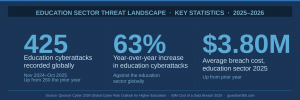
Education institutions are persistently attractive targets for several structural reasons: large volumes of personally identifiable information (PII), high user turnover creating credential management challenges, decentralized IT environments with limited security budgets, and deep integration with third-party platforms — exactly the scenario that allowed this breach to occur.
The ShinyHunters Pattern: This Is Not New
This is the second ShinyHunters attack against Instructure in less than a year. The September 2025 incident targeted Instructure’s Salesforce business systems via social engineering — no Canvas product data was involved. The May 2026 incident exploited the Canvas platform directly. ShinyHunters’ broader 2026 campaign also includes Udemy and Figure. Their 2025 campaign claimed 1.5 billion Salesforce records across multiple customer environments. This is a sophisticated, well-funded extortion group operating at scale.
Phishing was responsible for 34% of ransomware incidents in the education sector according to Quorum Cyber’s 2026 analysis, while exploited vulnerabilities (40%) and compromised credentials (37%) remain the leading root causes in higher education specifically. The data stolen in the Canvas breach — particularly email addresses and private messages — is exactly the kind of high-quality PII that enables spear-phishing campaigns of unusual precision.
4. The Guardian 365 Response: What We’ve Been Doing
From the moment Instructure disclosed this incident on May 1, 2026, the Guardian 365 SOC has been in active response mode. Here is what that has looked like in practice:
Guardian 365 SOC Actions Since May 1
✔ Increased SOC monitoring with specific analyst guidance on the incident and evolving threat landscape
✔ Deep log analysis of Canvas integrations, service principals, and enterprise apps within Microsoft 365
✔ IP address and IOC enrichment for indicators observed in Canvas-connected Microsoft 365 components
✔ Continuous monitoring of trusted threat intelligence feeds for new Canvas-related IOC
✔ Recurring threat hunts that refine as new intelligence becomes available
Current Status: No Confirmed Compromise Across the Guardian 365 EDU Community
As of May 13, 2026, Forsyte has not observed any confirmed identity, endpoint, application, or other tenant-related compromise stemming from the Canvas incident across our customer community. Combined with Instructure’s statement that the threat has been contained and verified by forensic experts, we now recommend that customers return to using Canvas integrations and applications with the permissions necessary for their academic operations.
5. Why the Canvas Breach Is a Microsoft 365 Problem
Even with the immediate threat contained, the data that was exfiltrated — and the perception of its existence — remains useful raw material for future attacks. This is where your Microsoft 365 environment becomes relevant.
Canvas and Microsoft 365 are deeply integrated in most education environments. That integration creates specific attack surfaces that adversaries can exploit long after the original breach is resolved:
- LTI (Learning Tools Interoperability) app registrations with delegated permissions in Entra ID
- SAML/SSO configurations that establish trust between Canvas tenants and Microsoft identity infrastructure
- Service principals published by Instructure within your tenant
- API keys and OAuth tokens that may have been issued to Canvas integrations
- Caliper Analytics and Canvas Data 2 integrations that interact with Microsoft storage and analytics services
OAuth App Governance — a feature of Defender for Cloud Apps, included with the M365 A5 Security license — is the control purpose-built for exactly this threat model. It enables security teams to apply pre-built and custom policies that detect anomalous data access or activity from connected OAuth applications. When a third-party SaaS integration is the source of risk, OAuth App Governance provides the early signal that matters most.
6. Ongoing Threat Vectors: What the Guardian 365 SOC Is Watching
The Guardian 365 SOC will maintain elevated monitoring for the following threat vectors. We recommend your internal security teams and awareness programs align with these same areas of focus.
Canvas-Themed Social Engineering and Phishing
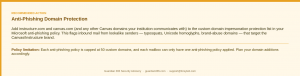
Threat actors routinely weaponize breach data in phishing campaigns that follow large-scale incidents. Expect to see Canvas or Instructure impersonation, lookalike login pages, and emails from senders claiming to possess or threatening to release breach data. Phishing is responsible for 34% of education ransomware incidents — this tactic is well-proven and will be employed.
Token Theft and OAuth Consent Anomalies
Token theft and malicious OAuth consent flows are particularly relevant in post-breach environments. Attackers who have obtained valid user credentials or session tokens from the breach may attempt to establish persistent access by registering malicious OAuth applications or hijacking legitimate ones. The Guardian 365 SOC recommends implementing and refining policies within OAuth App Governance to directly counteract and provide visibility into this type of threat.
Conditional Access and Token Protection
Token Protection policies in Conditional Access bind tokens to the device they were issued on, making stolen tokens far less useful to attackers. We continue to recommend that institutions pilot and then deploy Token Protection at the tenant level as a direct mitigation against the token theft scenarios most relevant to post-breach environments, and continue to leverage new features released by Microsoft as token protection continues to become a more critical security consideration.
7. Controls Summary: What to Implement Now
The following table summarizes the key controls most relevant to Canvas-adjacent risk in Microsoft 365 environments. These are not theoretical recommendations — they are the specific controls the Guardian 365 SOC has identified as most impactful in scenarios like this one.
| Control | What It Does | License / Location |
| Custom Domain Impersonation Protection | Flags inbound email from lookalike domains targeting Canvas/Instructure brand names | All M365 EDU licenses — Anti-Phishing policy |
| OAuth App Governance | Policy-based detection of anomalous OAuth application behavior from third-party SaaS integrations | M365 A5 Security — Defender for Cloud Apps |
| Token Protection (Conditional Access) | Binds tokens to issuing device, defeating token replay attacks using stolen credentials | Entra ID P1/P2 — Conditional Access |
| Entra ID App Registration Audit | Review and right-size permissions on Canvas LTI, SAML, and service principal registrations | Entra ID — App Registrations portal |
8. The Bigger Picture: What Education IT Leaders Should Take Away
The Canvas breach is a defining moment for education cybersecurity — not because it is unprecedented in its mechanisms, but because of its scale. When the platform used by 41% of North American higher education institutions is successfully breached, every institution in that ecosystem is affected in some way, whether through direct data exposure, downstream phishing risk, or the reputational and operational fallout of the incident itself.
The education sector entered 2026 carrying the weight of a difficult 2025: 251 ransomware attacks globally, 3.9 million records exposed, and an average breach cost of $3.80 million per incident. The Canvas breach is the largest single event in that already challenging landscape, and it will not be the last.
“While there is never complete certainty when dealing with cyber criminals, we believe it was important to take every step within our control to give customers additional peace of mind.” — Instructure statement, May 11, 2026
What separates institutions that manage incidents like this from those that are defined by them is not the absence of risk — it is the presence of the right controls, monitoring, and response capability before the next event occurs. That is precisely what Guardian 365 was built to provide.
Is Your Institution Fully Protected? Let’s Find Out.
The Canvas breach exposed a hard truth: most education institutions have Canvas deeply wired into their Microsoft 365 environment — and many have never taken a full inventory of what that means for their security posture. OAuth app registrations, service principals, SAML configurations, and API keys accumulate over time, often without dedicated review.
Guardian 365 gives your institution the 24/7 SOC coverage, proactive threat hunting, and Microsoft 365-native security controls that the education sector demands — without the cost and complexity of building it in-house. If you’re not currently a Guardian 365 customer, now is the right time to change that.
What a Guardian 365 engagement includes:
- 24/7 SOC monitoring purpose-built for Microsoft 365, Entra ID, and Defender XDR
- Proactive threat hunting and custom detection rules for education-sector threats
- Deployment and tuning of controls including OAuth App Governance, Token Protection, and Anti-Phishing policies
- Dedicated Guardian 365 analysts who know your environment, not a shared helpdesk queue
Current Guardian 365 customers: open a ticket at support@forsyteit.com to discuss this advisory or request a review of your Canvas integration footprint.
Not yet a customer? Reach out to us at info@forsyteit.com — we’d welcome the conversation.